



Description
Product description

Dual-mode and Rechargeable Mouse for Medium to Large Hand-sized Users


1 Up to 4800 DPI
2 Side Scroll Wheel
3 Rechargeable
4 Desktop button for Win
5 Forward & Backward


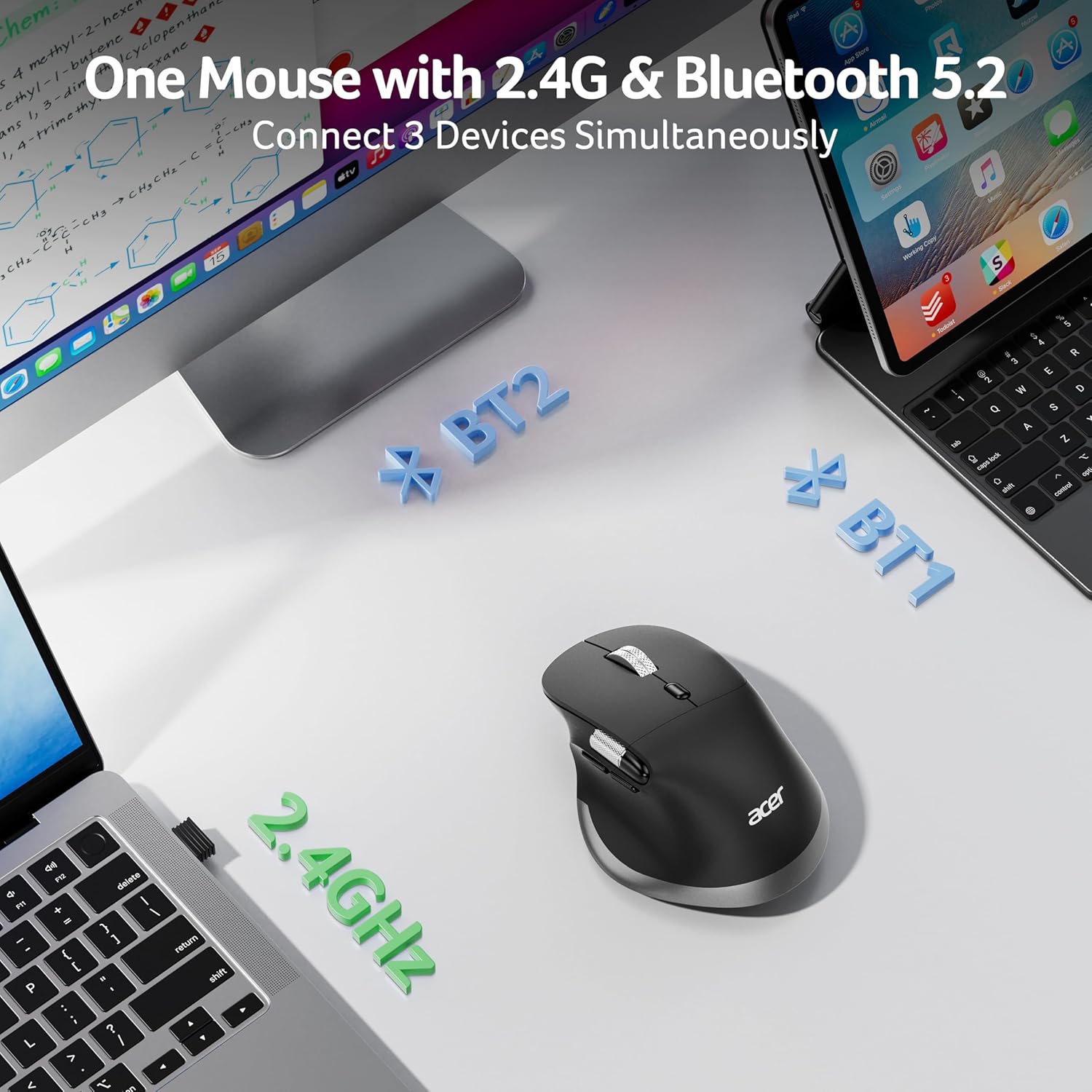
Q1 Why is my wireless mouse not working? – 1. Ensure the mouse is fully charged. 2. Make sure the power switch at the bottom of the mouse is turned on. 3. Ensure the USB receiver is properly connected to your computer. 4. Keep the mouse within 10 meters of your computer for optimal performance. Q2 Why does the ergonomic mouse feel uncomfortable? – 1. Switching from a traditional to an ergonomic mouse may require 1-2 weeks of adjustment. 2. Please adjust your grip to allow your palm to naturally fit the curve of the mouse to reduce hand fatigue. Q3 How to wake up the mouse? – The wireless mouse enters sleep mode after 10 minutes of inactivity, you can move the mouse to wake up. Q4 How to solve the problem of mouse lagging? – 1. Please fully charge the mouse. 2. The mouse can be used within an 8m range from the computer. 3. Long press the Left & Right Buttons and Scroll Wheel, plug in the USB receiver and re-match the code. Q5 Can this mouse be connected via Bluetooth? – Yes, you can connect with “OMR272 BT-1 / BT-2” via Bluetooth Q6 Is this mouse suitable for all hand sizes? – This mouse prefer medium to large sized hands users. This mouse is L 4.7 inches, W 3.1 inches, H 1.9 inches, and a weight of 3.8oz. Q7 Does this mouse make clicking sounds when used? – Yes, this mouse has a crisp clicks. Q8 Does this mouse have programmable buttons? – No, this mouse cannot be programmed.
Acer Mouse
Add to Cart
Add to Cart
Customer Reviews
4.3 out of 5 stars 3,127
4.2 out of 5 stars 633
4.0 out of 5 stars 798
4.0 out of 5 stars 302
Price
$25.99$25.99
$22.99$22.99
$27.99$27.99
$21.99$21.99
DPI
800,1200,1600,2400,3200,4800
1200,2400,3200,4000
1200,1600,2400,3200,4000
1200,1600,2400,5000,12K,24K
Side Butoon
✔
✔
✔
✔
Power Supply
Rechargeable
2 AAA batteries (Not included)
Rechargeable
Rechargeable
Bluetooth
✔
✔
✔
✘
Connection
Bluetooth and 2.4Ghz Wireless
Bluetooth and 2.4Ghz Wireless
Bluetooth, 2.4Ghz and Wired
2.4Ghz Wireless and Wired
Buttons
8
8
9
8
Visible Indicator Light
✔
✔
✘
✔
OLED Screen
✘
✘
✔
✘
【Pre-Use Notice】①The side scroll wheel button NOLY supports left-to-right movement when the page width exceeds the screen width. NOT be customizable. ②Fit for Users with 𝐌𝐞𝐝𝐢𝐮𝐦 𝐭𝐨 𝐋𝐚𝐫𝐠𝐞 𝐇𝐚𝐧𝐝𝐬. ③For comfort, require 1-2 weeks of adjustment. ④Please remove the film at the bottom of the mouse before use.
【Switch Effortlessly Across 3 Devices】This dual-mode bluetooth mouse for laptop allows you to switch between 2.4G and Bluetooth (2.4G, BT1, BT2) with a single click of the Mode Switch Button, allowing for seamless connection across three devices. Boost your productivity by effortlessly switching between your computer, laptop, tablet and Macbook Neo. 📌Note: Bluetooth mode and 2.4G mode cannot be used simultaneously.
【Ergonomic Design for Lasting Comfort】This ergonomic mouse wireless positions medium to large sized hands in a natural handshake posture. The computer mouse maintains neutral wrist and arm alignment to reduce pressure and pain. With a moderate weight of 108g, it ensures smoother operation, less strain, and prolonged comfort during extended use. 📌For comfort, require 1-2 weeks of adjustment.
【6-Level DPI Control】This cordless mouse offers 6 adjustable DPI settings (800/1200/1600/2400/3200/4800), allowing you to adjust sensitivity for precise design work. Easily switch sensitivity for a seamless workflow and enhance productivity.
【Seamless Thumb-Scrolling】Experience instant left and right page movement right under your thumb. This side scroll wheel enables effortless horizontal navigation, perfect for video editing, spreadsheets, timelines, and wide documents. Glide seamlessly through your work without lifting your hand. 📌Note: 𝐓𝐡𝐞 𝐬𝐢𝐝𝐞 𝐬𝐜𝐫𝐨𝐥𝐥 𝐛𝐮𝐭𝐭𝐨𝐧 𝐜𝐚𝐧 𝐍𝐎𝐓 𝐛𝐞 𝐩𝐫𝐨𝐠𝐫𝐚𝐦𝐦𝐚𝐛𝐥𝐞.
【High-Capacity Rechargeable Battery】This rechargeable mouse features a built-in 500mAh rechargeable battery, no need for replacements. It conveniently recharges via USB-C. The efficient battery provides extended usage time, making it a ideal choice.
【Navigate with Ease】This travel mouse boosts your workflow efficiency with dedicated forward/backward buttons, enabling swift browsing, seamless folder navigation, and quick application switching—all with a simple click. 📌The USB receiver stores inside the mouse.





Reviews
There are no reviews yet.